Getting views on YouTube is harder than it looks. You can publish a genuinely useful video, spend time editing it well, and still watch it disappear under a flood of new uploads. That is why using the right free SEO tools for YouTube matters. These tools help you understand what people are searching for, how strong the competition is, and what changes can improve your chaces of ranking.
In this guide, we break down the best tools for YouTube SEO, explain how they fit into a smart workflow, and show you how to use them without overcomplicating your process. Whether you run a small channel or manage content for a brand, the goal is simple: make every upload easier to discover.
Why YouTube SEO Matters More Than Ever
YouTube is not just a video platform. It is also one of the biggest search engines people use every day. That means your videos are competing not only on quality, but also on relevance, optimization, and discoverability. A solid video can still underperform if the title is vague, the description is weak, or the keyword targeting is off.
Many creators assume uploading consistently is enough. In reality, strong YouTube growth usually comes from combining content quality with smart optimization. That is where youtube seo tools free options become useful. They help you stop guessing and start making better publishing decisions.
- They reveal what viewers are actively searching for
- They help refine titles, tags, and descriptions
- They make competitor analysis faster
- They show what to improve before and after publishing
Best Tools For YouTube SEO: Our Top Free Picks
There is no shortage of tools in the market, but not all of them are worth your time. The most useful ones solve practical problems: finding keywords, checking optimization quality, and tracking how videos perform over time.
| Tool | Best Use | Why It Helps |
|---|---|---|
| VidIQ | Keyword research and competition analysis | Shows keyword scores, search intent signals, and competitor insights |
| TubeBuddy | Video optimization and audits | Gives tag suggestions, SEO checks, and publishing guidance |
| YouTube Studio | Performance tracking | Offers direct visibility into clicks, watch time, impressions, and retention |
| Google Trends | Topic validation | Shows how interest changes over time before you create content |
| RapidTags | Tag generation | Quickly surfaces related tags for faster optimization |
These are some of the best tools for YouTube SEO because they cover the essentials without forcing creators into expensive workflows too early. For many channels, a combination of two or three tools is enough to start improving visibility.
Free YouTube SEO Checker Tools You Need
A good free YouTube SEO checker helps you spot issues before your video gets buried. Instead of wondering whether your title is too weak or whether your description is too thin, you can review concrete suggestions and fix the basics before publishing.
This matters because small gaps add up. A missing keyword, a poor title structure, or tags that do not match search intent can quietly reduce your reach. SEO checker tools turn that guesswork into a repeatable process.
- TubeBuddy SEO Studio for quick audits and action points
- VidIQ Scorecard for optimization ratings and visibility signals
- RapidTags for relevant keyword and tag expansion
If you publish often, using a checker before every upload can save time and improve consistency. It is one of the easiest habits to build into your workflow.
YouTube Keyword Research Tools That Actually Help
Every strong YouTube strategy starts with keywords. The right youtube keyword research tools help you understand demand, competition, and phrasing. That means you can create videos around what people are already looking for instead of relying only on instinct.
One of the biggest mistakes creators make is chasing broad terms that are already dominated by giant channels. A smarter approach is to identify search phrases with decent demand and lower competition. That is often where smaller channels find their first real traction.
- Start with the main topic or question your video answers
- Use VidIQ, TubeBuddy, or YouTube autocomplete to expand ideas
- Look for phrases with clear intent and realistic competition
- Check trending interest using Google Trends
- Use the chosen phrase naturally in the title and description
These youtube keyword research tools are useful because they help you think like a searcher, not just like a creator. That shift alone can improve how you plan videos.
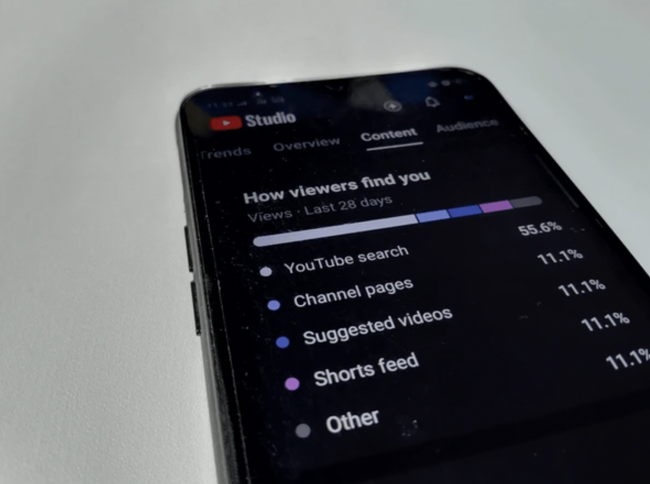
A simple keyword research flow that moves from topic ideation to validation and optimization.
Video SEO Optimization Tools For Better Rankings
Keyword research gets you started. Optimization is what helps a video perform. Strong video SEO optimization tools make sure your title, description, tags, and supporting elements all work together.
Many videos underperform because creators optimize one part and ignore the rest. A strong keyword in the title helps, but it is not enough on its own. YouTube reads multiple signals, and viewers respond to more than just search relevance.
- Title: Place the main keyword naturally near the front
- Description: Use the keyword early and explain the value of the video clearly
- Tags: Add relevant variations without stuffing
- Thumbnail: Make it clear, click-worthy, and visually distinct
- Captions: Improve accessibility and contextual relevance
When you consistently use video SEO optimization tools, your publishing process becomes cleaner, faster, and more strategic.
YouTube Ranking Tools To Track What Is Working
SEO is never a one-time action. You need to measure performance, spot patterns, and make smarter decisions over time. That is where youtube ranking tools become valuable.
Tracking tells you which keywords are starting to gain visibility, which videos are attracting impressions, and where you may need to revise titles or descriptions. Without this, it is easy to keep repeating the same mistakes.
A simple tracking routine can include:
- Checking impressions and CTR inside YouTube Studio
- Reviewing keyword movements in VidIQ or TubeBuddy
- Comparing month-over-month performance
- Updating older videos that show ranking potential
The goal is not to obsess over every number. It is to use youtube ranking tools to guide your next few decisions more intelligently.
How To Use These Tools Together Without Overcomplicating Your Workflow
One of the easiest ways to waste time is to use too many tools at once. A simpler workflow usually performs better because it is easier to repeat consistently.
A practical setup looks like this:
- Use Google Trends or VidIQ to validate the topic
- Use TubeBuddy or VidIQ for keyword and optimization suggestions
- Publish with a clean title, detailed description, and relevant tags
- Track impressions, CTR, and ranking changes in YouTube Studio
- Adjust based on performance instead of guessing
This kind of workflow is what makes free SEO tools for YouTube genuinely useful. You are not just collecting data. You are turning that data into better publishing habits.
Why These Free SEO Tools For YouTube Still Matter In 2026
Creators often assume free tools are too limited to be useful. That is not always true. While premium plans add more depth, the free versions of many tools are enough to improve content planning, on-page optimization, and performance tracking.
For solo creators, freelancers, and growing brands, starting with free seo tools for youtube is often the smartest move. You can build a solid system first, then decide later whether deeper features are worth paying for.
Why Work With SocialOrange
Tools are helpful, but tools alone do not build a strategy. At SocialOrange, we look at how your content, search intent, titles, thumbnails, and conversion goals connect. That is what turns isolated uploads into a more consistent YouTube growth system.
We help brands move beyond vanity metrics by focusing on what actually improves visibility and performance. From keyword planning to optimization and reporting, our goal is to make your content easier to discover and more effective once people find it.
Conclusion
The best YouTube growth strategies are rarely built on guesswork. They come from choosing the right topics, optimizing every important element, and reviewing performance often enough to improve. That is exactly where free SEO tools for YouTube make a difference.
If you want better rankings, stronger video discoverability, and a workflow that feels more structured, start with a few reliable tools and use them consistently. And if you want expert support in building that system, SocialOrange can help you turn content into measurable growth.
Frequently Asked Questions
What are the best free SEO tools for YouTube in 2026?
The most useful options include VidIQ, TubeBuddy, YouTube Studio, Google Trends, and RapidTags. Together, they cover research, optimization, and tracking.
How do I use the best tools for YouTube SEO effectively?
Start with keyword research, optimize the title and description, add relevant tags, and then track impressions and rankings. Keep the process simple and repeatable.
Can youtube keyword research tools help small channels grow?
Yes. They help smaller channels find realistic opportunities by targeting lower-competition phrases that are still relevant to the audience.
How long does it take to see results from YouTube SEO?
Some videos start showing movement in 2 to 4 weeks, especially when optimization is consistent and the topic has clear search demand.
Does SocialOrange help with YouTube SEO services?
Yes. SocialOrange supports brands with YouTube SEO strategy, keyword research, optimization, and performance tracking to improve long-term visibility.